
Sparkworks is Enshrouded's 1.0 logic system. How to unlock it, how inputs and outputs connect in the 2D graph editor, and what to build with it.
Enshrouded Sparkworks Guide: How the Logic System Works
Sparkworks is a logic system added in Enshrouded 1.0. You unlock it by crafting a new set of tools and interactive props, and from there you connect inputs to outputs and attach behaviour rules to those connections. The official example is the clearest explanation of the scope: pull a lever or step on a pressure plate, and something happens, such as a door opening or a trap opening underfoot. To make complex setups manageable, 1.0 also adds a 2D graph editor where inputs, outputs, connections and rules are configured and visualised.
- Sparkworks is crafted, not given. You need the tool and prop set before any logic exists.
- Inputs and outputs are wired together, and the 2D graph editor is where the wiring lives.
- The same system covers light switches, traps, puzzles, parkour courses, arenas and escape rooms.
- The Airborne Architect skill sits at the centre of the skill tree and adds free-flying building.
- Finished builds can be published through Adventure Sharing, which 1.0 also expanded.
What Sparkworks actually is
A logic system sounds abstract until you look at what the official material promises. Sparkworks is a way to connect inputs such as pulling a lever or stepping on a pressure plate with outputs such as a door opening or a trap opening underfoot. That is the whole idea, and the depth comes from how many inputs and outputs you chain together.
The official uses list is deliberately broad. Sparkworks is pitched for toggling lights, trap dungeons, puzzles, enemy encounters, parkour courses, arenas and escape rooms. Those are not separate modes. They are all the same mechanism with different props attached, which is why a player who builds one working door switch already understands the core of the feature.
If you played any building game with wire logic before, the mental model transfers. The difference here is that it lives inside a survival RPG, so the props have to be built from materials like everything else.
Unlocking the tools and props
Access starts with crafting. The official changelog says Sparkworks "can be accessed by crafting a new set of tools and interactive props", and that is the practical gate. There is no separate menu that exists from character creation, and no cheats or creative mode that hands you the pieces.
Two consequences follow from that:
- Material planning matters. The interactive props are crafted items, so a puzzle build competes with armor and base projects for the same resources.
- You want a base with a workable crafting setup first. The tool and prop recipes sit inside the normal crafting progression rather than beside it.
The related quality-of-life change is that 1.0 introduced the Quick Stash Station earlier in the crafting progression, with a small side quest to introduce it, and reworked storage so 24-slot chests and Magic chests unlock sooner. Building a logic contraption involves a lot of materials moving around, so those two changes land at the right time.
Inputs and outputs in plain language
The official description names four things directly, and everything else you will encounter is a variation on them.
| Type | Official example | What it does |
|---|---|---|
| Input | Pulling a lever | Sends a signal when the player interacts |
| Input | Stepping on a pressure plate | Sends a signal on contact |
| Output | A door opens | Consumes the signal and moves something |
| Output | A trap opens underfoot | Consumes the signal and changes the floor |
The important part is that an output can also be a trigger for something else. That is how you get from a single switch to a full trap corridor, and it is also why the 2D graph editor exists. Once a build has more than a handful of connections, a list stops being readable and a diagram does not.
Rules are the second half of the system. A connection tells the game that A talks to B. A rule tells it when and how, which is what separates a light switch from a timed trap sequence.
Working in the 2D graph editor
The official changelog describes the editor in one sentence: a new 2D graph editor has been added where all the inputs and outputs can be configured, and where the connections and rules are visualised in a convenient way. Three practical notes follow from that wording.
- It is a graph, not a script. You are placing and linking nodes, so no coding or text input is required.
- It is separate from the world. You configure the logic in the editor rather than by clicking every prop in your base.
- It is the debugging view. When a trap fires at the wrong time, the graph is where the wrong rule is visible.
What the official material does not provide is a full prop list, a node reference, or limits on how many connections a single build can hold. Those numbers are not in the 1.0 changelog or the Sparkworks announcement. If a build starts lagging or refusing new nodes, that is the point to test rather than to assume a documented cap.
The cost of a logic mistake is materials. Build a two-prop test cell in your base, confirm the input triggers the output the way you expect, and only then wire the real corridor. The official trailer setup of a bridge replaced by trapdoors is a good first project because it only needs one input and one output.
Ideas that actually work in a base
The official use cases are a reliable starting list because they are all tested by definition. Ranked by how much they are worth the materials:
- Light switches. The lowest-risk project. One input, one or more outputs, and no way to kill a friend.
- Door and gate control. Practical before it is clever. A lever that opens a base entrance from the inside is worth more than a novelty trap.
- Trap corridors. Pressure plates wired to traps. This is where rules start to matter, because you want the trap to fire on the right step.
- Puzzle rooms. Multiple inputs in sequence, with an output that only triggers when the order is correct.
- Parkour courses. Inputs and outputs placed to reward timing rather than combat.
- Arenas and enemy encounters. Logic that controls spawn conditions and arena furniture.
- Escape rooms. The end state of everything above, and the reason Adventure Sharing exists.
The honest caveat is that the complexity has to be paid for in build time. A working escape room is a weekend of building, and most players will get more value from a clean light switch and a working base door than from a half-finished puzzle wing.
Airborne Architect and free-fly building
Sparkworks is the logic layer, and Airborne Architect is the movement layer that arrived in the same update. The skill sits at the centre of the skill tree and enables building in a free-flying mode. The official notes joke that scaffolding experts are out of a job, but the mechanical effect is straightforward: you can fly while placing structures instead of climbing the thing you are building.
For logic builds this matters more than it first appears. Trap corridors are usually built from the outside in, and free-flight placement removes the awkward step of building temporary scaffolding inside a corridor you are about to fill with props. The skill is in the centre of the tree, so it is reachable from most builds rather than locked behind one class path.
Adventure Sharing, the delivery system
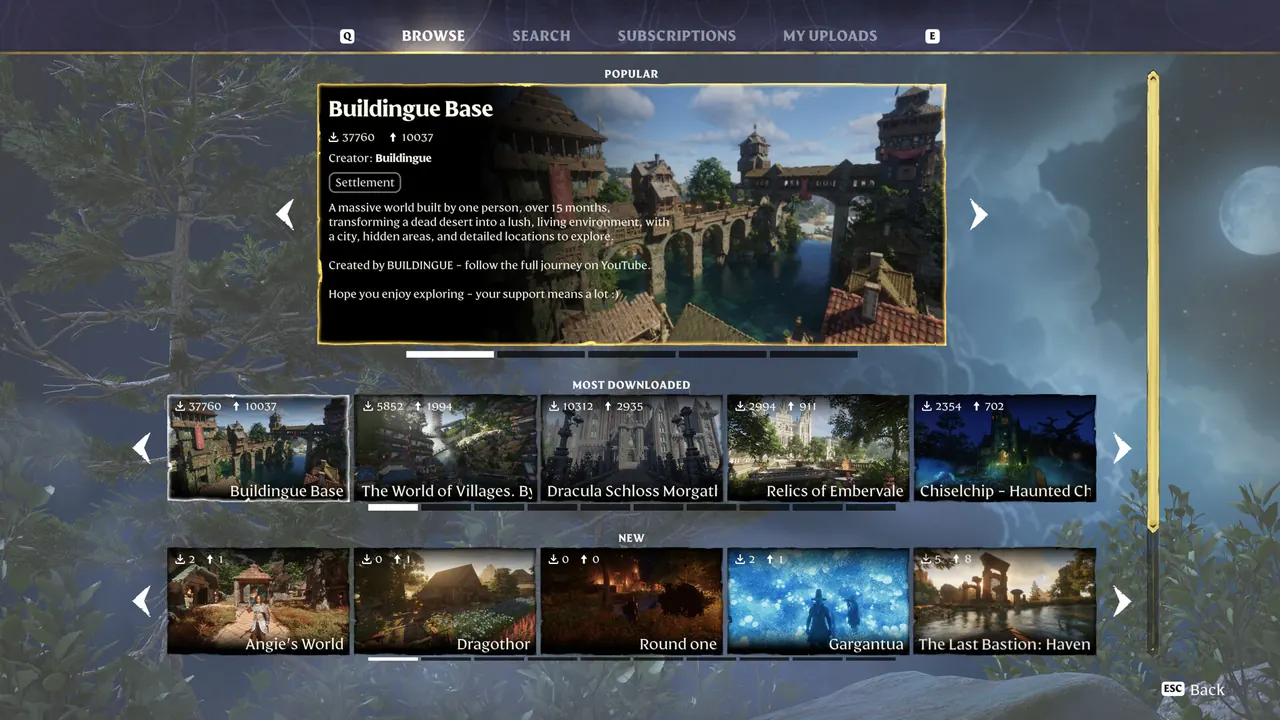
A logic build is only half a project until other players can run it. Adventure Sharing is the piece that makes a trap corridor into something a stranger plays, and 1.0 improved the surrounding menu rather than the core feature.
The official 1.0 notes list the changes:
- Every sorting category now has a "show more" button that opens the complete list sorted by that category.
- A new category for highlighting adventures was added.
- Creators got several new tags to describe their adventures.
- You can now remove your up or downvote on a shared adventure.
- The name and details of a shared adventure can be viewed while visiting it, and voting is possible from inside the adventure.
Two of those are quality-of-life in a very specific way. Removing a vote matters because a first impression is sometimes wrong, and voting from inside the adventure means you do not have to leave and find it again in the list. The Hotfix 1.0.0.2 release then fixed crashes in Adventure Share subscription and browsing, so the 1.0.0.0 experience of subscribing to shared content was rougher than the feature list suggests.
Official source: Turn your build into an adventure with Sparkworks!
The official Sparkworks introduction video is also on the Keen Games YouTube channel, and the full 1.0 feature list sits on the Steam news hub.
FAQ
How do I unlock Sparkworks in Enshrouded? You craft the new set of tools and interactive props that 1.0 adds. Sparkworks is accessed through those crafted items rather than through a separate menu from the start.
What inputs and outputs does the logic system support? The official examples are a lever and a pressure plate as inputs, and a door opening or a trap opening underfoot as outputs. The full prop list has not been published in the 1.0 notes.
Is the graph editor required to use Sparkworks? It is the intended workflow for complex setups. The official changelog describes it as the place where inputs and outputs are configured and where connections and rules are visualised, which is what makes multi-step logic readable.
What does the Airborne Architect skill do? It enables building in a free-flying mode. It was added in 1.0 and sits at the centre of the skill tree.
Can other players play the builds I make? Yes, through Adventure Sharing. 1.0 added a highlighting category, new creator tags, and the ability to remove a vote and to vote while inside a shared adventure.
Did the logic system launch in a stable state? Hotfix 1.0.0.2 fixed crashes in Adventure Share subscription and browsing, so the earliest hours of shared content were rougher than the final state of the feature.
Related Guides
- Logic props are base props, and the 1.0 no-build changes decide where you can place them: Enshrouded Base Building Guide
- The tool and prop recipes sit in the normal crafting chain, so plan materials properly: Enshrouded Crafting Guide
- Trap corridors are the closest thing Sparkworks has to a dungeon, and the real ones work differently: Enshrouded Hollow Halls Guide
- Chest and rune changes matter if your build project competes with gear upgrades: Legendary Gear in Enshrouded 1.0
More Enshrouded Guides
Enshrouded ranger build for 1.0: Puncture, Barrage and Survival Instinct, the three new Eternal arrows, aim assist settings and the reworked ranger armor tiers.
What Enshrouded 1.0 changed about bosses, including the reworked Albaneve Summits fight, stun tactics, and boss health recovery.
How to reach Cinder's Cradle in Enshrouded 1.0, what the lava ruins and floating islands contain, its 12 new Shroud Roots, and the Flame level to bring.
How crafting works in Enshrouded 1.0: which stations exist, crafting from storage, the Gem Forge and Quick Stash Station, and the recipes the patch rebalanced.
Enshrouded has no crossplay at 1.0, so PC and PS5 cannot share a world yet. Here is how co-op works, the player cap, permissions and progress sharing.
The server tool ships free with the game and is Windows only for now. Config fields, UDP port 15637, user groups and the new Automatic enemy scaling.
An Enshrouded Elixir Well is a Shroud pocket with a Shroud Root at the bottom. What it awards, why it may not reset, and what 1.0 did and did not change.
How many enemy types Enshrouded 1.0 adds, which factions got new variants, and how the reworked damage susceptibility system changes fights.